Everything a student, tutor, parent or school needs — in one platform
Azzpira Prep & Revise is a complete preparation and tutoring platform for the Digital SAT, IELTS, TOEFL and ACT, with full English Grammar and Vocabulary courses behind them. Lessons that teach, original questions that explain themselves, timed mock tests with honest score reports, a study plan that rebuilds after every result — and a real tutoring toolkit sitting on top of the same data.
Every part of the platform, explained — and where to find it.
01
Six complete exam courses, one platform
Most sites do one exam. Azzpira carries the Digital SAT, IELTS, TOEFL, ACT, English Grammar and Vocabulary — each with the same dependable shape: overview, syllabus, lessons, practice, mock tests, scores and resources. A student switching from SAT to IELTS never has to learn a new interface, and a tutor teaching four exams works from one place.
Every tested topic on every exam, in the official order it appears
Grammar and Vocabulary feed all four exams, so one hour of grammar counts toward SAT, IELTS, TOEFL and ACT progress
Course tabs follow a single logical flow: Overview → Lessons → Practice → Mock Tests → Scores → Resources
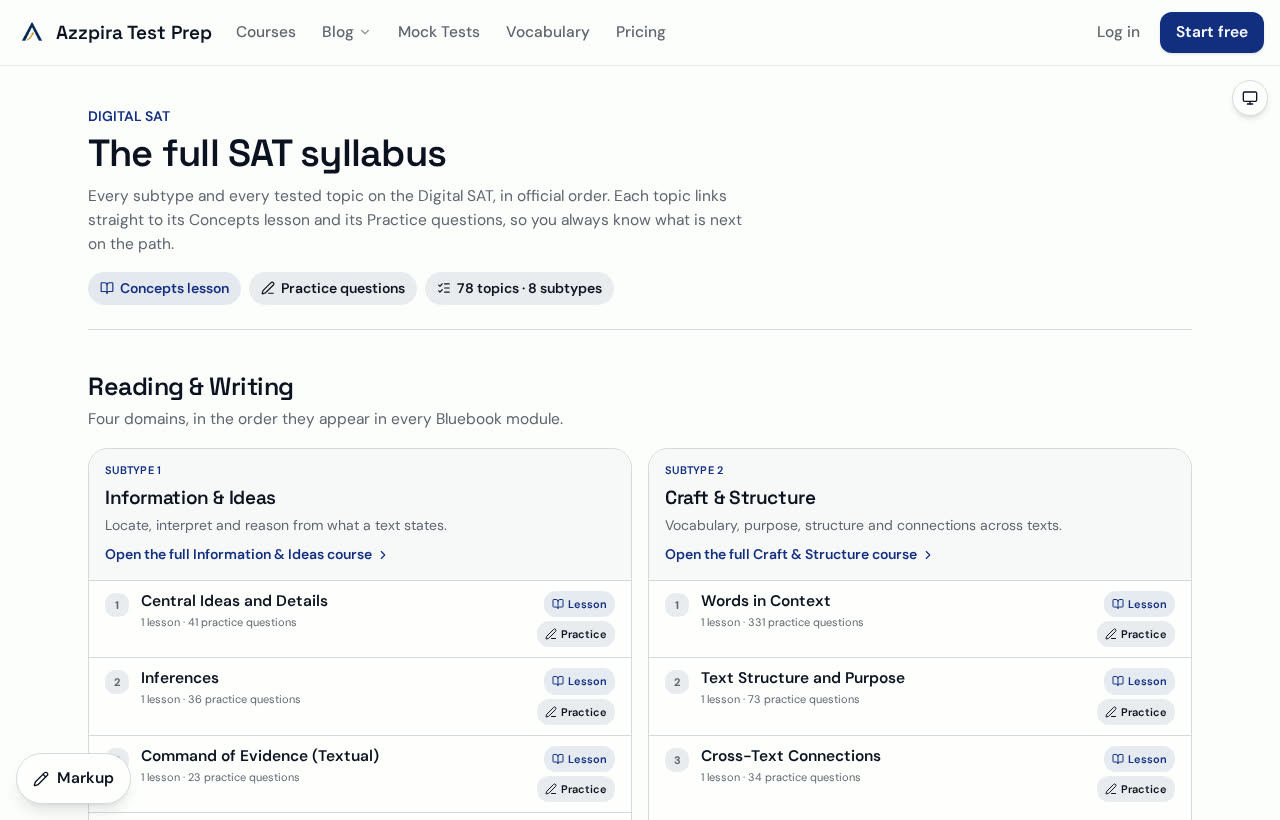
The full Digital SAT syllabus page listing every subtype and topic with lesson and practice linksBrowse the courses
02
The whole syllabus, mapped and linked
Students rarely fail because a topic is hard; they fail because they don't know what is left. Every course has a syllabus page listing each domain, subtype and topic with the number of lessons and questions behind it — and every line is a link straight to the lesson or the practice set.
78 SAT topics across the 8 official subtypes, plus full maps for IELTS, TOEFL, ACT, Grammar and Vocabulary
Per-topic lesson and question counts, so nothing is a black box
One click from a topic to the teaching, and one more to the practice
Each subtype is a progressive course, not a pile of tips: chapters build in order, with a teaching brief, a three-step method, worked examples, the traps that catch students, keyword cues and infographic diagrams. Maths is typeset properly — real fractions, roots, exponents, subscripts and symbols, not broken text.
Progressive chapters with Previous / Next navigation and adjustable font size
Worked examples, common-mistake warnings, timing guidance and strategy in every chapter
Interactive exercises inside the lesson, with instant feedback, explanations and saved progress
Desmos guidance wherever the calculator beats algebra
Thousands of original questions, filterable by section, domain, skill, difficulty, question type and status. Practise one weak skill at a time, or mix it up. The 300 most challenging Math and Reading & Writing question sets exist for students already scoring well who need the top band.
Every question carries difficulty, topic, skill, expected timing and a full explanation
Wrong-answer explanations — why each distractor is tempting and what it tests
An SAT shortcut, an alternative solution and a calculator recommendation on applicable items
Hints first, answers second: coaching guides students instead of handing over the key
Realistic timed mock tests with honest score reports
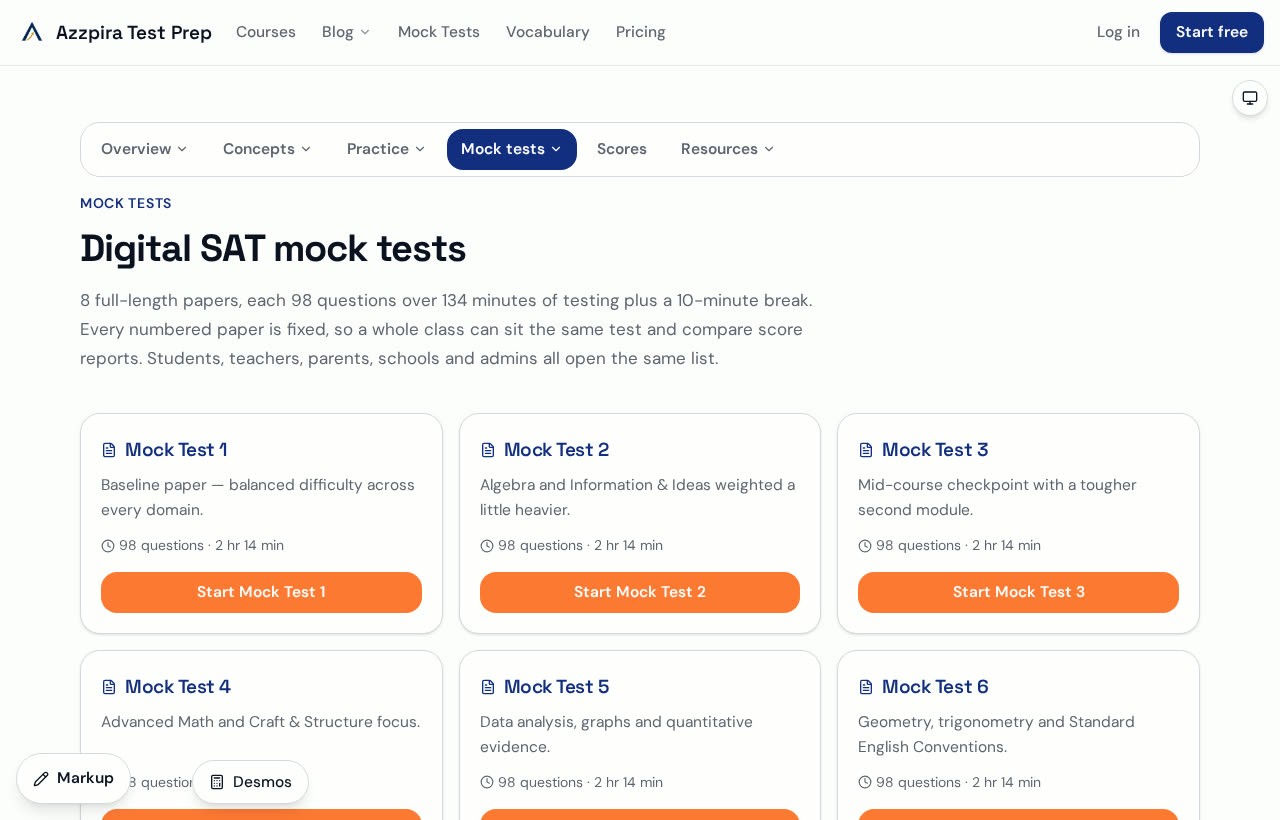
Eight fixed, full-length Digital SAT papers in Bluebook style — adaptive modules, countdown timer, mark-for-review, question navigator and the built-in calculator. IELTS, TOEFL, ACT, Grammar and Vocabulary each have their own timed mock scored the way the real exam is scored: bands for IELTS, 0–120 for TOEFL, 1–36 for ACT.
Numbered papers, so a whole class can sit the same test and compare results
Instant score report: section splits, predicted score, accuracy by topic and time per question
Question-by-question review of correct, incorrect, skipped and flagged items
Every mock result feeds the prep plan, the dashboards and the tutor's view automatically
The Digital SAT mock test list showing eight full-length papers with question counts and timingsSee the mock tests
06
A prep plan that rebuilds itself after every test
Enter a target date and target score, sit a diagnostic — or type in a Bluebook, school or official score report — and the platform lays out a week-by-week timeline: what to study, how many questions, which difficulty, when the next mock falls. After each result it recalculates around the new weak areas.
Level bands built in: Beginner 1000–1190, Intermediate 1200–1390, Advanced 1400–1600
Weekly goals and milestones linked directly to the lessons and practice sets they refer to
Bring outside scores in by hand — no need to have taken a mock here first
Prefer to run your own? Switch the plan to a drag-and-drop board and keep the suggested plan alongside
A full vocabulary course — word lists, word families, collocations and exam-specific usage — with a game layer on top: flashcards, roots and prefixes, matching, speed rounds, context puzzles and spaced repetition, plus a timed vocabulary assessment and its own dashboard.
Roots, prefixes and suffixes so students can decode unseen words in the exam
Spaced repetition and a daily challenge that keeps review honest
Drag-and-drop learning stages showing exactly which words are mastered
The graphing calculator lives in a picture-in-picture window on every lesson, practice set and mock test. Drag it anywhere, resize it from any edge or corner, collapse it to a title bar or take it full screen — and every applicable Math question carries a written Desmos shortcut too.
Available across all six courses, not only SAT Math
Move, resize, collapse and maximise — it stays out of the way until you need it
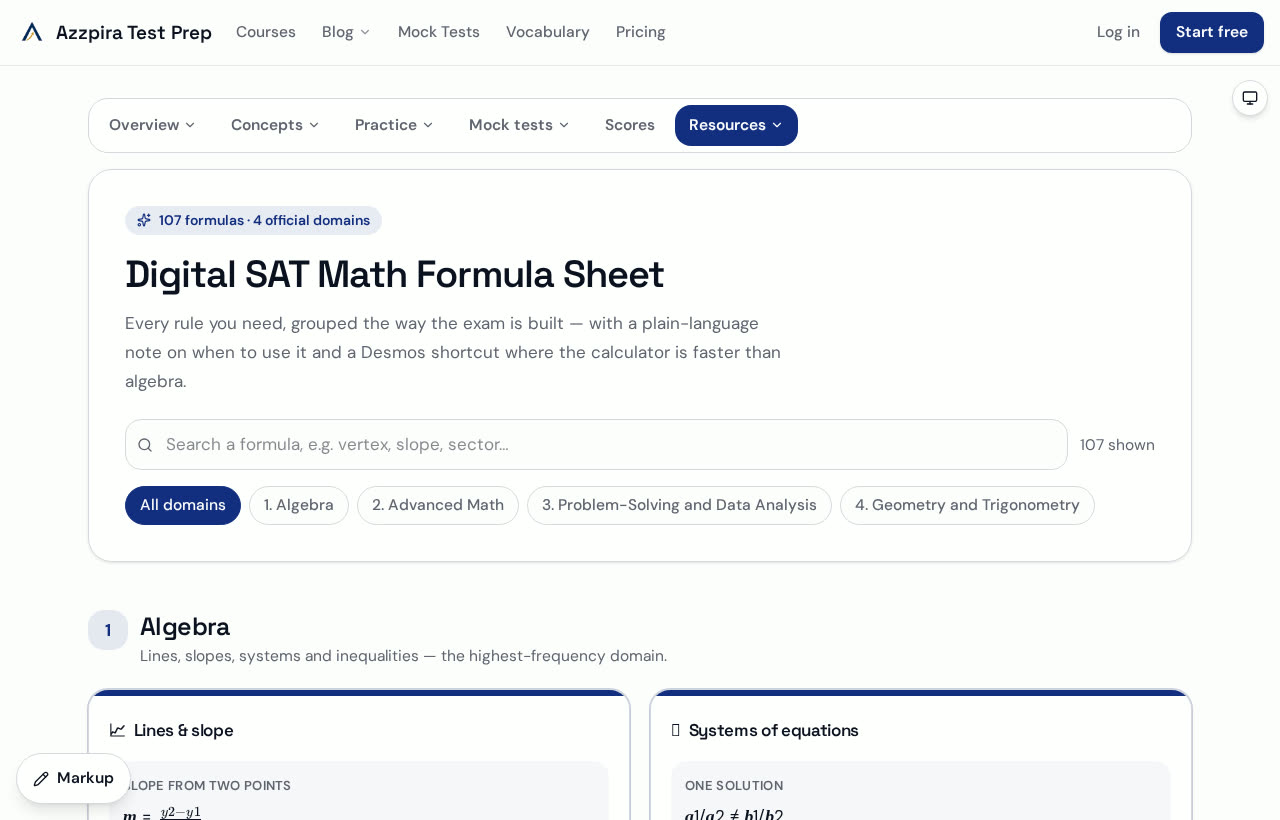
Paired with a 107-formula reference sheet grouped by official domain
The Digital SAT Math formula sheet with searchable cards grouped by official domainOpen the formula sheet
09
Whiteboard and annotation, saved to the student's account
Mark up any page like a PDF, or open a full whiteboard with room to write. Import PDFs, images, text files or a live web page onto the board, add pages, rename, share with another account and annotate together in real time — then save it to Notes or download it.
Annotate mode for marking the page itself; Whiteboard mode for space to explain
Everything saves to the student's own account and appears in the tutor and parent views
Session notebooks for lessons, personal notes for private study
A real tutoring platform, not just a content library
Tutors get classes with join codes and invite links, rosters, assignments and homework with marking, question-set creation, live lesson tools with whiteboard and calculator, shared session notes, lesson plans and per-student reports — all reading the same data the student sees.
My Students: every learner's course progress, mock scores, saved work and messages in one view
Set a mock test for a whole class and compare score reports side by side
Eight ready-made 65-minute SAT lesson plans with topic breakdowns
A staff-only Tutor Vault with exclusive exercises and 10, 15, 20, 25 and 30-hour packages recommended from the student's diagnostic level
Lock content for students when you want to control the pace
A parent account is linked to their child and shows practice, mock scores, homework, saved work and the session notes the tutor chooses to share. Schools and learning centres get cohorts, many tutors, seat counts, shared content and exportable reports.
One shared record behind every portal — student, tutor, parent and school never see conflicting figures
Organisation dashboard with cohorts, memberships and analytics
Role-based access throughout: admins approve tutors, schools manage their own staff
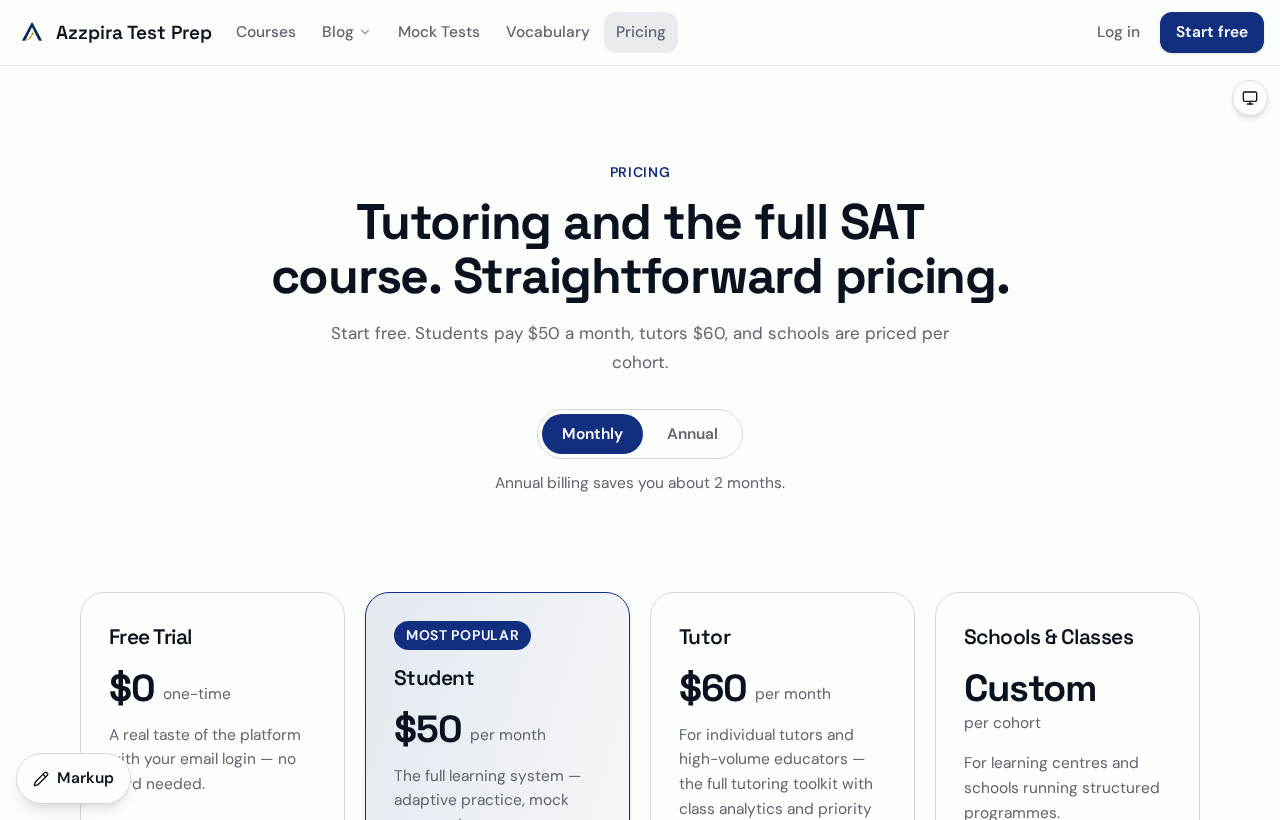
The Azzpira pricing page showing student, tutor and organisation plansSee plans
12
Free, public study material
A growing library of original articles and strategy guides for all six courses — readable without an account — plus a demo guide that walks through every portal.
Course-specific blogs for SAT, IELTS, TOEFL, ACT, Grammar and Vocabulary
Strategy, timing, trap patterns and topic explainers
A navigation demo showing what each account type can do
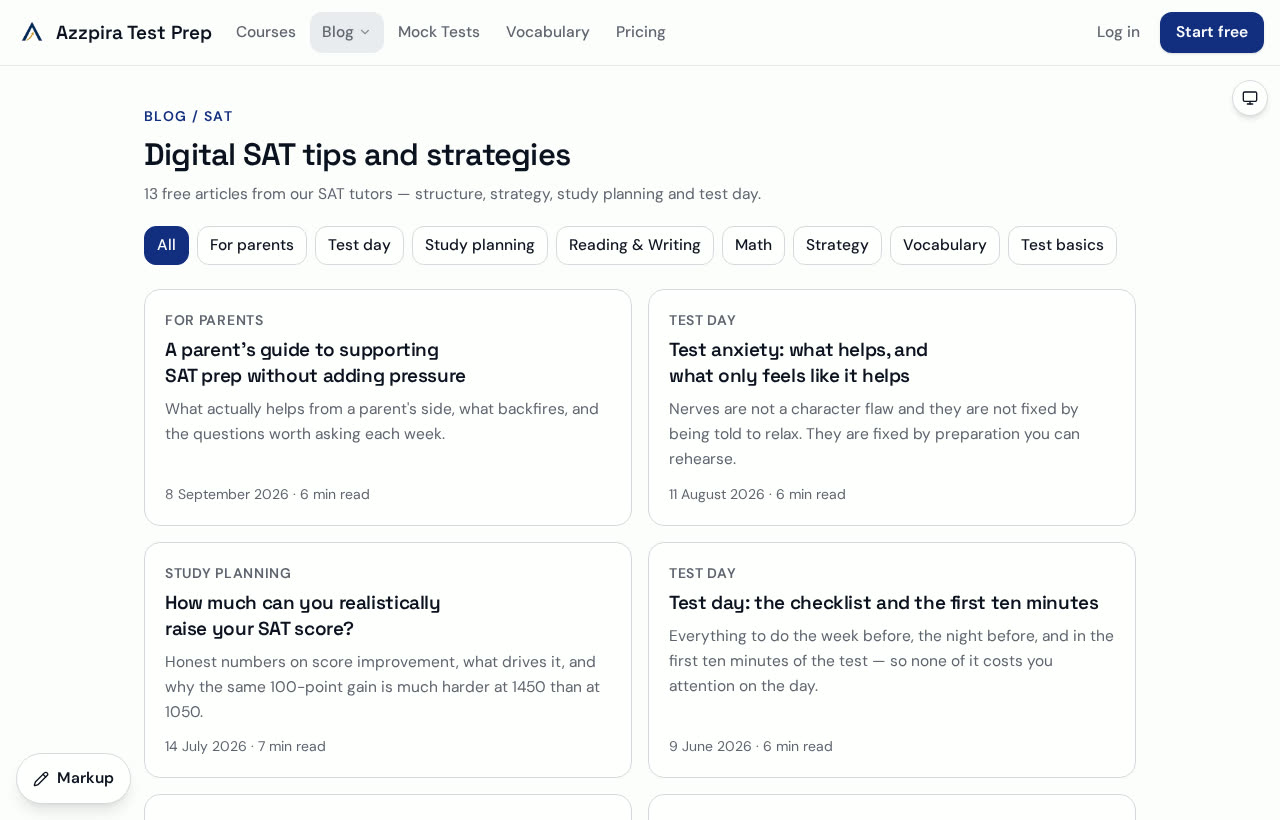
The SAT blog index with original strategy articlesRead the blog
What makes it different
Original content, always
Every question, passage and explanation is written in-house to match the style and difficulty of the real exam. No copyrighted exam material is reproduced anywhere on the platform.
One record, every portal
Progress, practice accuracy and mock scores are stored once and read everywhere, so a parent, a tutor and a student are never arguing about different numbers.
Teaching, not just testing
Other platforms sell question volume. Azzpira pairs each question with a method, a trap warning, a shortcut, an alternative route and a calculator tip — so a wrong answer becomes a lesson.
Coaching that holds back the answer
Hints come first. Students are guided toward the reasoning instead of being shown the key, which is what actually moves a score.
Self-study and tutoring in the same product
A student can work alone from day one and add a tutor later with a class code — no migration, no second subscription, no lost history.
Fast, accessible, dark-mode ready
Heavy tools load only when opened, pages are keyboard and screen-reader friendly, and light, dark and system themes are available on every page.
Who it is for, and what they get
StudentsCourses, a syllabus you can see the end of, original practice, real mocks, a plan that adapts, saved notes and a dashboard that says what to do next.
TutorsClasses, invites, assignments, marking, live lesson tools, lesson plans, exclusive staff material, per-student reports and messaging.
ParentsTheir child's practice, mock scores, homework, saved work and shared session notes — without needing to ask.
Schools & centresMany tutors, many cohorts, shared content, seat management and reports you can export.
Straightforward pricing
Free trial$0 · One mock test, sample lessons, practice and a vocabulary game
Student$50 · per month — every course, every mock, the full plan
Tutor$60 · per month — classes, marking, live tools, staff material
Schools & centresCustom · priced per cohort — talk to us